

EFT Payouts
Overview
NoteAll team members are able to view the Payouts report. For more details on user group role permissions, see Roles.
If the merchant account has been configured to support EFT routed Interac Payouts, the EFT Payouts report contains all transaction details for EFT routed transactions.
To view the Payouts report, go to Transactions > EFT Payouts.
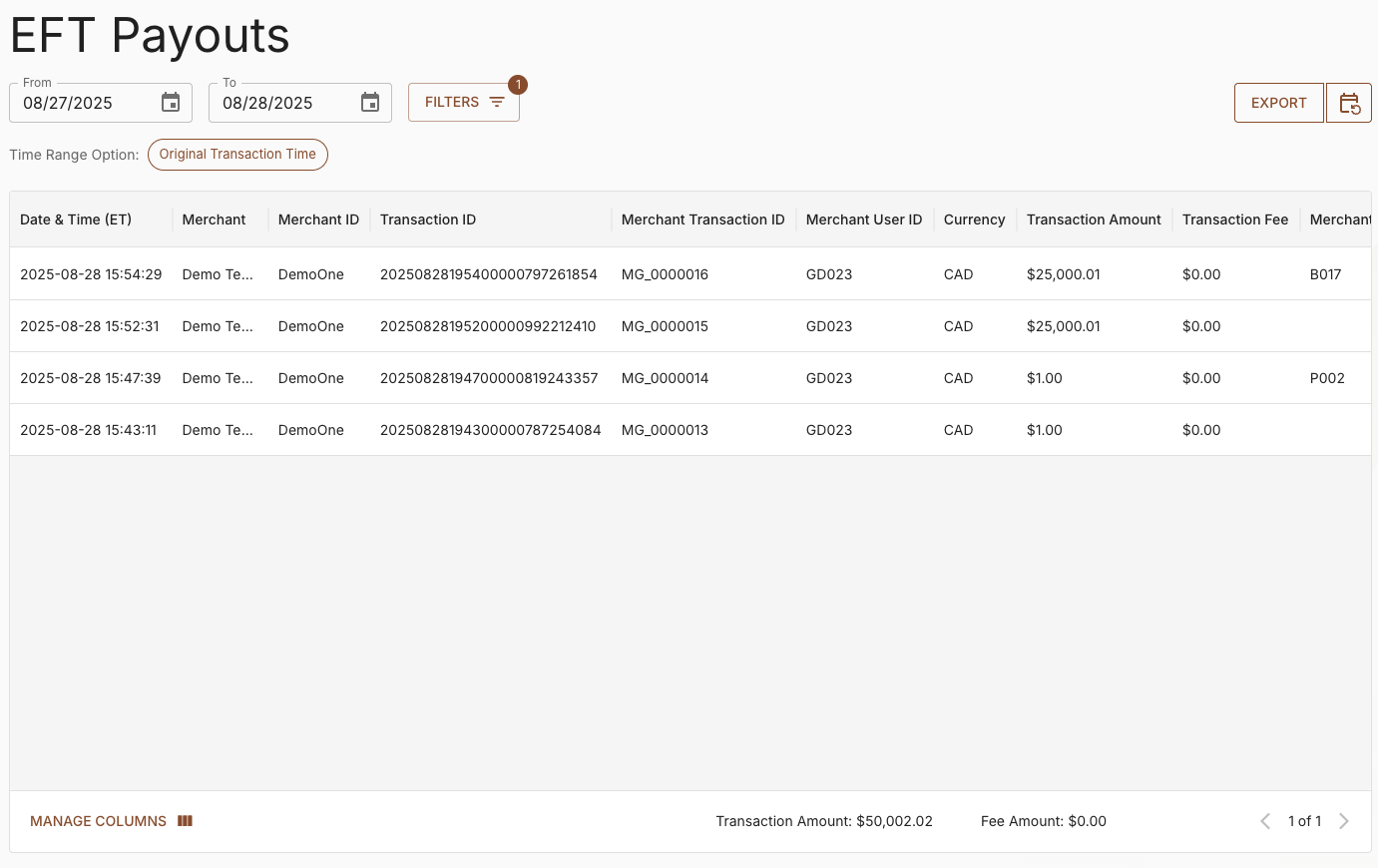
INTERAC Payouts Report
The report can be filtered by Date Range, Txn Status, Time Range Option, Txn ID, Merchant Name, Merchant Txn ID, and Merchant User ID to view specific details.
In the EFT Payouts report, the maximum number of rows that the application can export to a CSV file is 500,000.
The message “Exported data exceeded the allowed volume. Some data may have been omitted.” is added at the footer of the CSV file when the limit is hit. To avoid this, consider limiting the record count to less than 500,000 by filtering the report.
There are two options for the Time Range Option:
-
Original Transaction DateTime – The date and time that the transaction was initiated.
-
Transaction Completion DateTime – The date and time that the transaction status became successful or rejected.
The report is rendered with the Original Transaction Date/Time as default, but can be changed to show the Transaction Completion Date/Time.
The INTERAC Payouts report contains the following information.
| Column | Contents |
|---|---|
| Date & Time (ET) | The date and time that Paramount received the transaction. |
| Merchant | The name of the merchant. |
| Merchant ID | The Paramount-assigned merchant ID. |
| Transaction ID | The unique transaction ID assigned by INTERAC. |
| Merchant Transaction ID | The merchant-assigned transaction ID. |
| Merchant User ID | The merchant-assigned consumer user ID. |
| Transaction Amount | The dollar amount of the transaction. |
| CUR | The ISO 4217 3-digit alphabetic currency code. |
| Transaction Status | The transaction status.
|
| Transaction Fee | The transaction fee charged against the merchant account. |
| Merchant Error Code | The error code associated with a rejected transaction. |
| Description | The unique identifier assigned to the transaction, referenced in the email sent to the consumer. |
| Notification Status | Status of the transaction notification between INTERAC and the merchant system.
|
| Transaction Completion Date & Time (ET) | The date and time that the Paramount system processed the transaction as successful or reject |
| Return Date (ET) | The date the transaction was returned. |
Updated 11 months ago