

Request Money Native Apps Updates
There are two areas of improvement in the native app experience that will eliminate unnecessary clicks and simplify the INTERAC® Request Money consumer experience.
Request Money - Launch Workflow
Some merchant native apps may block the launch of URLs outside of the app and the Request Money payment flow. As a result, an error occurs when a consumer selects their bank from the INTERAC gateway URL web page or when a consumer accepts the request from their bank's app or web page. The solution below solves this issue.
Bank Selection URL
The Bank Selection URL is the best solution for the INTERAC Request Money launch workflow. This allows the INTERAC bank selection (INTERAC gateway URL) to launch as a new native browser tab.
We recommend that URLs that contain interac.ca are allowed to open in an external browser.
Some of the benefits of this workflow include:
Easy UpdatesINTERAC URLs can change at any time, so checking the interac.ca domain simplifies updates.
Covers All BanksChecking the interac.ca domain avoids building checks for each bank's app and web applications.
Less TestingTesting complexity is directly related to the number of banks that need to be supported.
User Experience
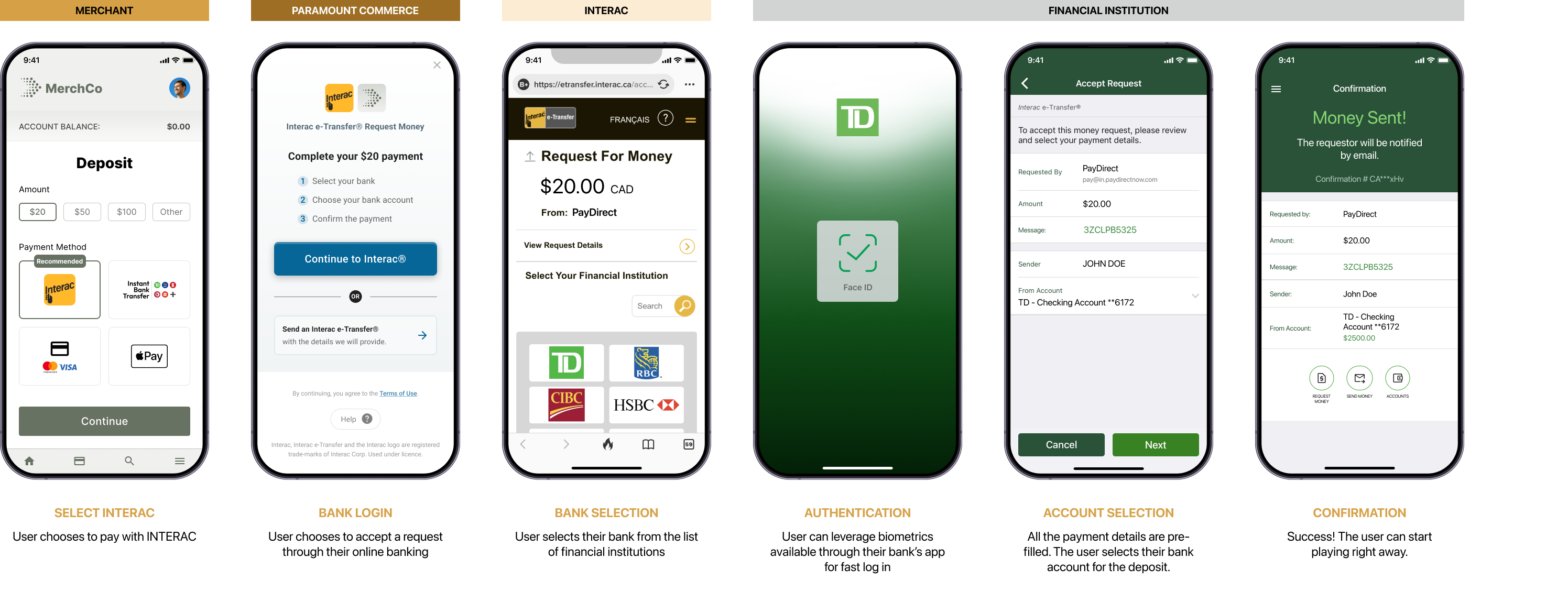
INTERAC Request Money - End-to-End Flow
Launch Workflow Example Code
A single check to see if the URL is from the interac.ca domain and if action is required.
func webView(_ webView: WKWebView, decodePolicyFor navigation: WKNavigationAction, decisionHandler: @escaping (WKNavigationActionPolicy) -> Void) {
    if (/*url is from INTERAC: contains “interac.ca”*/) {
        decisionHandler(.cancel)
        if let url = navigationAction.request.url {
            UIApplication.shared.open(url, options:  [:])
        } else {
            decisionHandler(.allow)
        }
    }
}webViewClient = object : WebViewClient() {
override fun shouldOverrideUrlLoading(view: WebView?, request: WebResourceRequest?): Boolean {
val urlString = request?.url.toString()
if (/*url is from INTERAC: contains “interac.ca”*/){
it.startActivity(Intent(Intent.ACTION_VIEW, request?.url))
return true
}
return super.shouldOverrideUrlLoading(view, request)
}
}Sample INTERAC URL:
Request Money - Return to Merchant Workflow
In some instances, the user flow following a transaction (the consumer’s banking app) does not automatically return the consumer to the merchant cashier (the merchant’s native app) where the status of the transaction can be displayed. The return to merchant workflow solves this issue.
User Experience
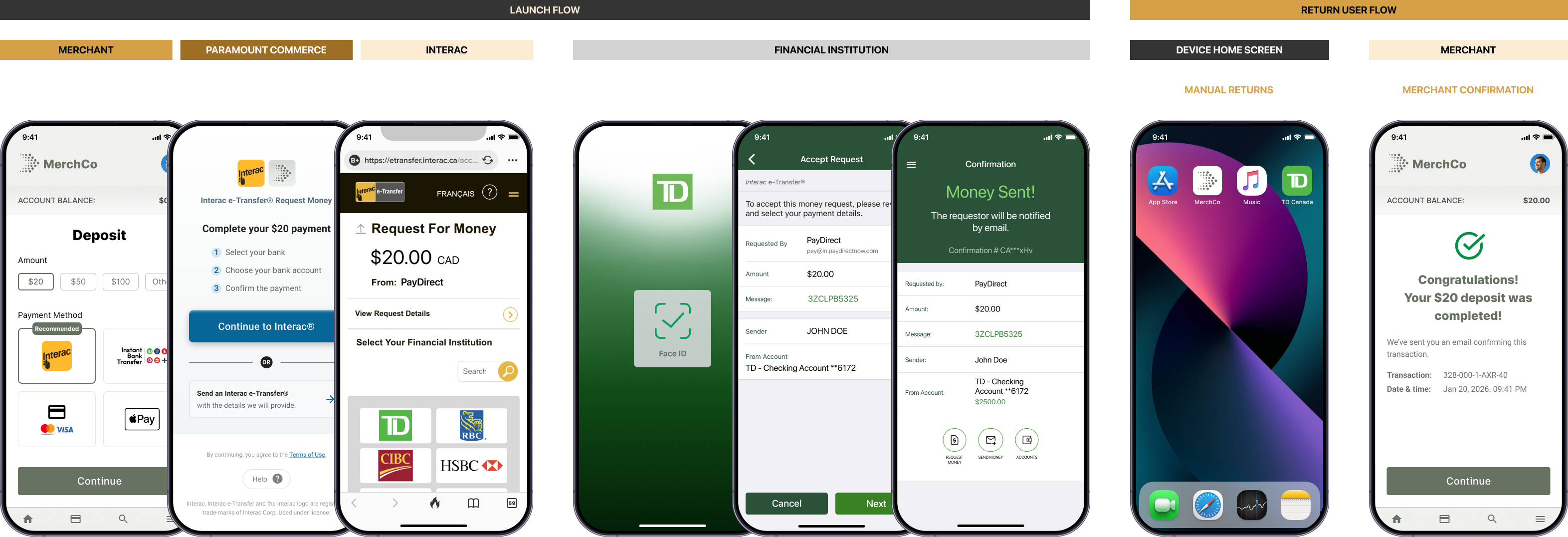
INTERAC Request Money - Return to Merchant Flow
Return to Merchant Example Code
The following sample code can be used to take the consumer back to the appropriate URL/merchant page, after a consumer has completed the payment with their banking app.
import { Linking } from 'react-native';

const handleNavigationStateChange = (event: WebViewNavigation) => {
  if (event.url && event.url.includes('interac.ca')) {
    openInExternalWebview(event.url);
    handleNavigateBack();
  }
};

// Function to open a URL in the external browser.
const openInExternalWebview = (url: string) => {
  if (url) {
    Linking.openURL(url);
  }
};

// Function to handle navigation back to merchant cashier
const handleNavigateBack = () => {
  const merchantCashierUrl = 'https://www.merchant-cashier-url.ca';
  Linking.openURL(merchantCashierUrl);
};import android.content.Intent
import android.net.Uri
import android.webkit.WebView
import android.webkit.WebViewClient
// Set a WebViewClient to handle page navigation.
webView.webViewClient = object : WebViewClient() {
override fun shouldOverrideUrlLoading(view: WebView?, url: String?): Boolean {
if (url != null && url.contains("interac.ca")) {
// Open the URL in the external browser.
openInExternalBrowser(url)
// Handle navigation back to merchant cashier.
handleNavigateBack()
return true
}
return super.shouldOverrideUrlLoading(view, url)
}
}
// Function to open a URL in the external browser.
fun openInExternalBrowser(url: String) {
val intent = Intent(Intent.ACTION_VIEW, Uri.parse(url))
startActivity(intent)
}
// Function to handle navigation back to merchant cashier
fun handleNavigateBack() {
val merchantCashierUrl = "https://www.merchant-cashier-url.ca"
webView.loadUrl(merchantCashierUrl)
}Updated 7 months ago