

INTERAC Payments
INTERAC Flows
After being directed to the INTERAC payments screens, consumers can choose between two user flows to complete their payment:
Request Money Flow
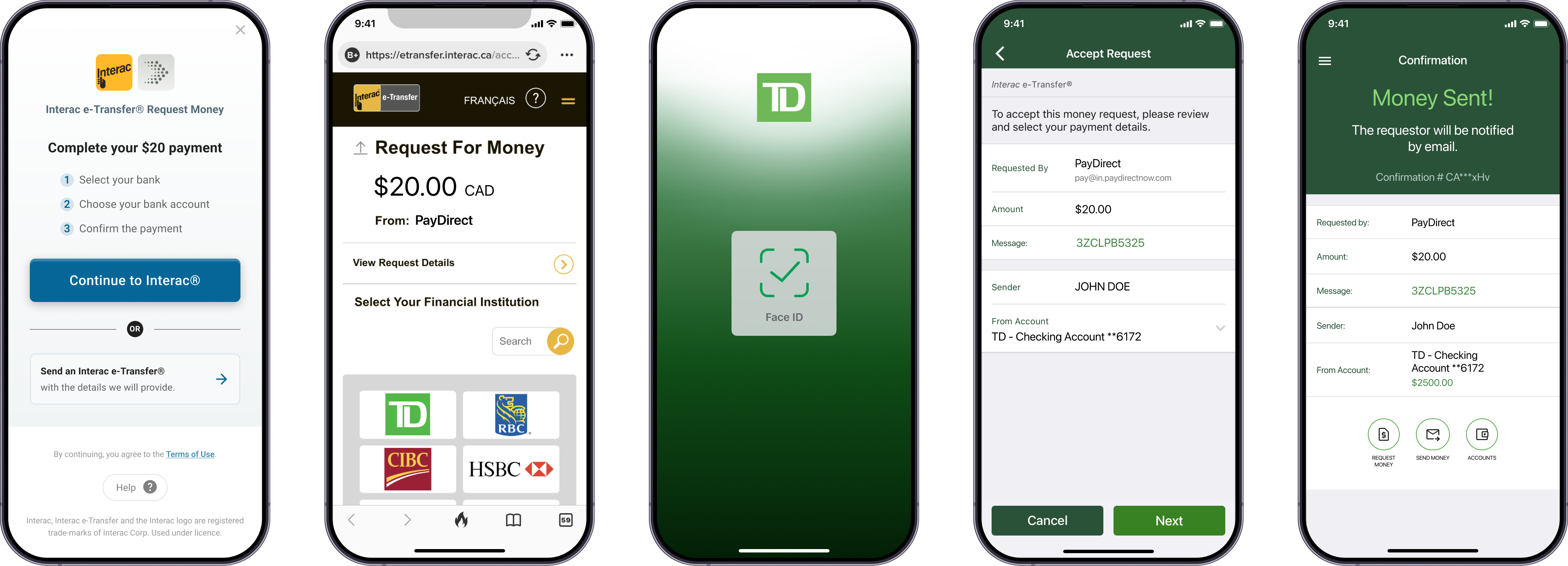
INTERAC Request Money Flow
| Consumer Payment Experience | The consumer logs in to their bank within the transaction flow (on the PayDirect screens) to accept the request for money. |
| Bank Support | Supports all Canadian banks. |
| Payment Notification | The merchant and consumer receive an immediate notification of the successful payment. |
| Consumer Requirements | The consumer is required to log in to their bank within the payment flow to complete payment, including any multi-factor authentication (for example, SMS confirmation) required by the bank. No out-of-transaction steps are required. The consumer has 24 hours to accept the request for money. |
Send Money Flow
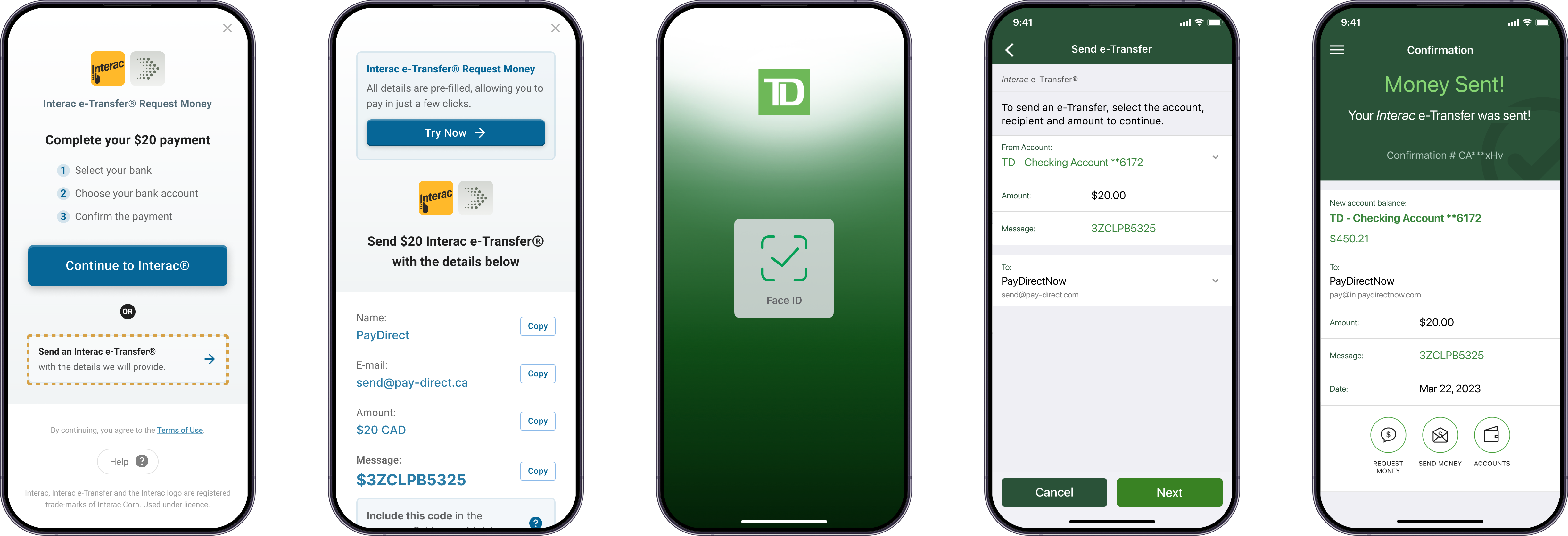
INTERAC Send Money Flow
| Consumer Payment Experience | The consumer needs to copy unique payment details within the transaction flow (on the PayDirect screens) and then log in to their bank website or app (outside the transaction flow) and enter payment details. |
| Bank Support | Supports all Canadian banks. |
| Payment Notification | The merchant and consumer receive notification of payment success when the funds are received (5-10 minutes). |
| Consumer Requirements | Payment and recipient details must be accurate in order for the payment to be successful. Required input fields include: Name - Specified in transaction. Email - Specified in transaction Phone number - Specified in transaction. Amount - Payment amount. If the consumer sends a different amount than initiated on the merchant's cashier, the payment will be unsuccessful and their funds will be returned to them. Message - The message is used to link received INTERAC e-Transfer with the corresponding payment initiated on the merchant's site. We recommend the amount to match the payment amount initiated on the merchant's site. It is up to the discretion of the merchant whether they want to enforce the Amount to match the payment amount or not. This configuration is completed during integration. Security Question & Answer - These fields are not required by PayDirect to complete payment, however some banks require them. |
Returns
There is no automated mechanism for a consumer to return an INTERAC transaction. Consumers must contact their bank to request a return and their bank will contact the PayDirect customer support team (Paramount’s end consumer brand).
Return Process
The PayDirect customer support team will communicate with consumers directly to resolve any issues. If the return is valid, the merchant will receive notification of the return and the funds will be deducted from their merchant account balance.
Blocking Consumer's AccountThe decision about whether to block the consumer’s wagering account is made by Paramount on a case-by-case basis.
INTERAC Payments API
See the INTERAC Payments API reference for more information on creating and handling INTERAC payments.
Updated 7 months ago